

~/.xum/mcp.jsonc, with optional repo overrides in ./.xum/mcp.jsonc.
Configuration
You can either configure the servers in the UI (Ctrl+,):
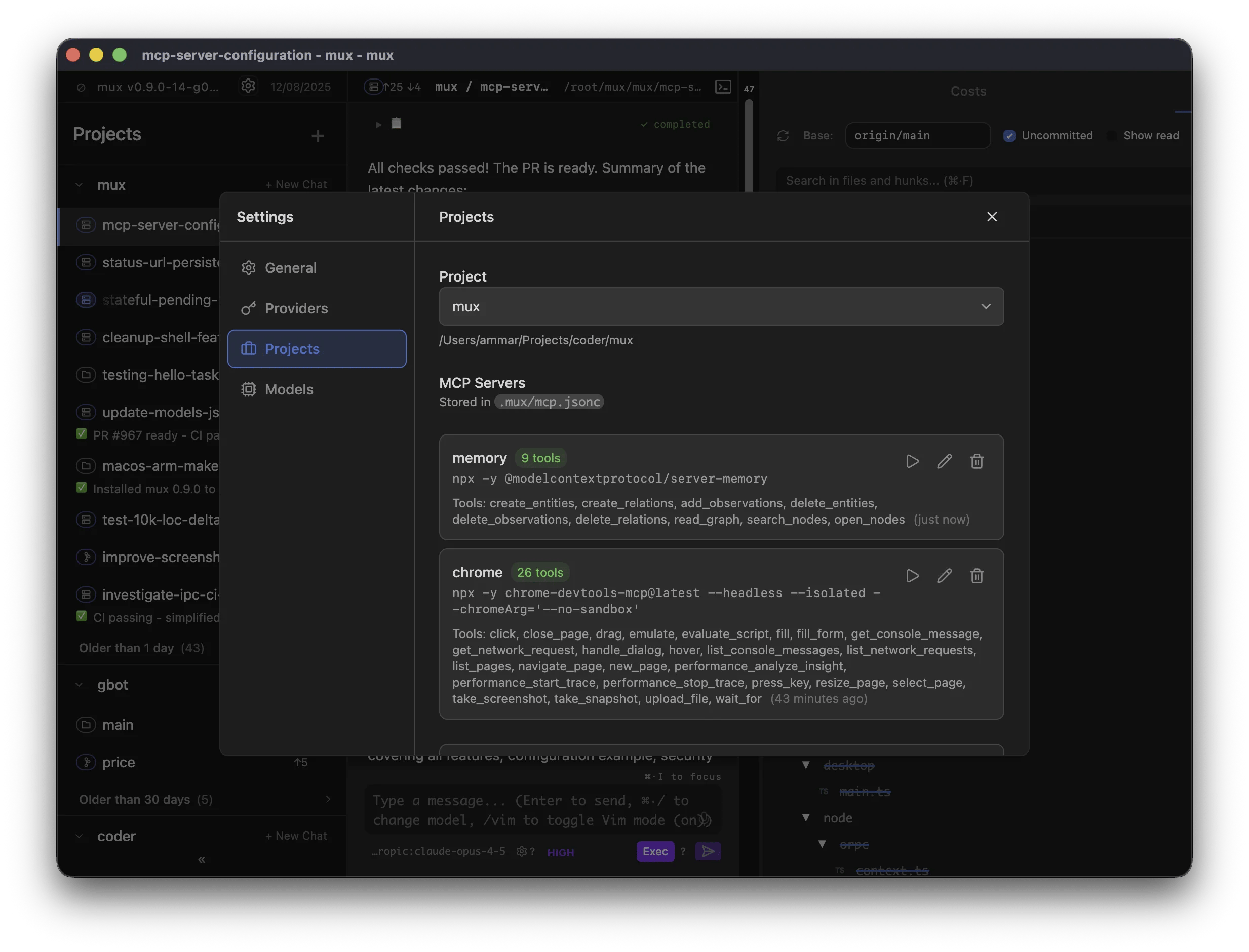
~/.xum/mcp.jsonc, repo overrides: ./.xum/mcp.jsonc):
Managing servers
Manage MCP servers in Settings → MCP (or by editing the config files directly).Scope
MCP servers have two scopes:- Configuration is global with optional repo overrides — Global config lives in
~/.xum/mcp.jsonc, with optional repo overrides in./.xum/mcp.jsonc - Runtime instances are per-workspace — Each workspace runs its own server processes, so state in one workspace doesn’t affect another
Per-workspace overrides
Xum supports per-workspace MCP overrides (enable/disable servers and restrict tool allowlists) without modifying the shared config files (~/.xum/mcp.jsonc / ./.xum/mcp.jsonc).
These overrides are stored in a workspace-local file: .xum/mcp.local.jsonc.
- This file is intended to be gitignored (it contains local-only workspace preferences)
- When Xum writes this file, it also adds it to the workspace’s local git excludes (
.git/info/exclude) so it doesn’t get accidentally committed - Older Mux versions stored these overrides in
~/.mux/config.json; Xum migrates them into.xum/mcp.local.jsoncon first use - Legacy project files under
.mux/remain readable when the corresponding.xum/file is absent
Agent Plugins servers (experiment)
With the Agent Plugins experiment enabled (Settings → Experiments), MCP servers declared in an Agent Plugin’smcp.json also appear in server listings. Plugin servers are:
- Disabled by default — enable them per workspace via the Workspace MCP dialog; there is no global enable
- Read-only — they cannot be edited or removed, and are never written into
mcp.jsonc - Trust-gated — servers from a repo’s
.xum/plugins/.agents/pluginsonly appear once the project is trusted - Host-only — plugin servers are skipped for SSH and devcontainer workspaces
- Branch-following — in a workspace, repo plugin servers load from the workspace’s own checkout (matching skill discovery), while server identities stay stable across worktrees of the same project
PLUGIN_ROOT and PLUGIN_DATA environment variables; per-plugin data directories live under ~/.xum/plugin-data/.
Settings → Plugins installs plugins from git into ~/.xum/plugins (paste a git URL or owner/repo[@ref]); the exact location derives from the active Xum home (a legacy ~/.mux home keeps working) and is shown in the section. Before anything is written, a consent preview lists the plugin’s manifest, every skill, and every MCP server command line. Installs are pinned to the resolved commit; update checks compare the tracked branch or tag against the pinned commit and never auto-apply. Applying an update replaces the plugin directory wholesale — local edits to a managed plugin directory are discarded — and restarts that plugin’s running MCP servers. Uninstalling removes the directory, the registry entry, and the plugin’s per-workspace server overrides, but keeps ~/.xum/plugin-data/ unless you opt in to deleting it.
Behavior
- Hot reload — Config changes apply on your next message (no restart needed)
- Isolated — Server processes run in the workspace directory with its environment
- Lazy start — Servers start when you send your first message in a workspace
- Idle timeout — Servers stop after 10 minutes of inactivity to conserve resources, then restart automatically when needed
Finding MCP Servers
Browse available servers at mcp.so or the MCP servers repository.Troubleshooting
If a server fails to start:- Test the command manually — Run the command in your terminal to verify it works
- Check dependencies — Ensure required packages are installed (
npx -ydownloads on first run) - Use the Test button — Settings → MCP shows connection errors inline
Claude Design experiment
Enable Claude Design MCP in Settings → Experiments, then configure the Claude Design card in MCP settings. Turning on the experiment alone does not read credentials or connect. Choose a credential source on the Mux backend host shown in the card:- On macOS, select the Keychain service and account used by your Claude Code
installation. The usual service is
Claude Code-credentials, with your OS username as account. Custom Claude configuration directories can change this; confirm your installation’s values. Keychain reads fail without prompting if access is unavailable. - On macOS, Linux, or Windows, you can explicitly select an absolute credential
file path. Claude Code installations using plaintext fallback commonly use
~/.claude/.credentials.json; expand the path and confirm it exists on the backend host. Mux does not search for files or infer directory overrides. POSIX files must belong to the backend user and deny group/other access. Windows files must belong to the backend user and grant access only to that account, SYSTEM, and administrators.
claude_design globally in MCP Servers. Workspace MCP
controls can restrict access, but cannot enable a globally disabled Design server:
checkout-local files are not authoritative consent to use your Claude credentials.
Existing tool allowlists and HTTP MCP policy still apply. A conflicting
server name must be renamed or removed first; Mux never replaces that server or
lends it Claude credentials.
Mux prefers an unexpired designOauth access token. It can fall back to an
unexpired claudeAiOauth token only when both user:design:read and
user:design:write are explicitly present. API keys are not a substitute.
Credential storage and token compatibility depend on Claude Code’s private
implementation; this is an unsupported compatibility experiment, not an
independent OAuth client.
Claude Code owns login, scope authorization, consent, refresh, and revocation.
When setup is missing, credentials expire, or Design requests consent, complete
that action in Claude Code on the backend host and select Retry connection.
Mux does not initiate those flows. On a 401 it rereads storage once and retries
only if the same credential kind now has a different usable token. It never
refreshes or writes Claude tokens, acquires Claude refresh locks, or automatically
replays a failed tool after consent.
All Design HTTP requests originate on the backend host, including for SSH and
container workspaces. A browser connected to a remote Mux backend uses credentials
on that remote backend, not credentials on the browser’s computer. Credentials
are never forwarded into workspace processes or returned to the renderer.
Disconnect disables reuse and server enablement. Disabling the experiment
also stops its clients and removes its tools from subsequent catalogs. Neither
action logs out Claude Code, revokes consent, or modifies its credential store.
Requests already accepted by Design cannot be undone. Mux stores only source and
enablement preferences in <config.rootDir>/claude-design.json, normally under
~/.xum/; borrowed tokens are not copied there or into mcp.jsonc.
The card supports Ctrl/Cmd+Enter to connect and Ctrl/Cmd+Shift+D to disconnect
while focus is inside the form. Native platform credential access and live Design
compatibility must be verified in your deployment; automated tests use synthetic
credentials and a local MCP server.